
Super App
Microsoft Start provides users with a familiar browser experience, improved navigation, personalized features, and a suite of mini-apps such as Weather, Shopping, Sports, and Games. The homepage design for this update is key to delivering the new experience.

My role
I designed homepage cards, layouts, and mini-app tiles. This work contributed to making the app more visually expressive, coherent across touchpoints, and consumer-friendly.
Collaborators
Lead design
Director
PM
Engineers
Platform
Android
IOS
Project Goals
- Create a cohesive and intuitive overall app layout that aligns with the desktop experience.
- Design visually striking homepage cards.
- Support various content types across the app.
- Explore concepts for community user engagement features like commenting and emoji interactions.
- Integrate complex nav features while maintaining a smooth user experience throughout the platform.
Results
Delivered a high-fidelity prototype and MVP conversational framework for the SPINS GenAI Assistant, aligning 5 cross-functional teams on how AI insights fit into existing workflows. In internal reviews, 90% of stakeholders preferred the familiar chat approach, and the concept projected a 40% reduction in time to insight for common data questions.

Primary homepage card designs in the app before the update
The goals for the primary homepage cards included being more visually expressive, offering a variety of cards for different types of content, enhancing engagement through social media features like commenting and emoji interactions, and ensuring alignment with the latest desktop browser.

Desktop browser design
One of the key considerations for this project was desktop alignment. Consistency in card elements benefits the user experience across platforms and reinforces the brand. However, the mobile experience is unique, and mobile user patterns were considered for the card builds. Below are explorations for the primary homepage news cards.
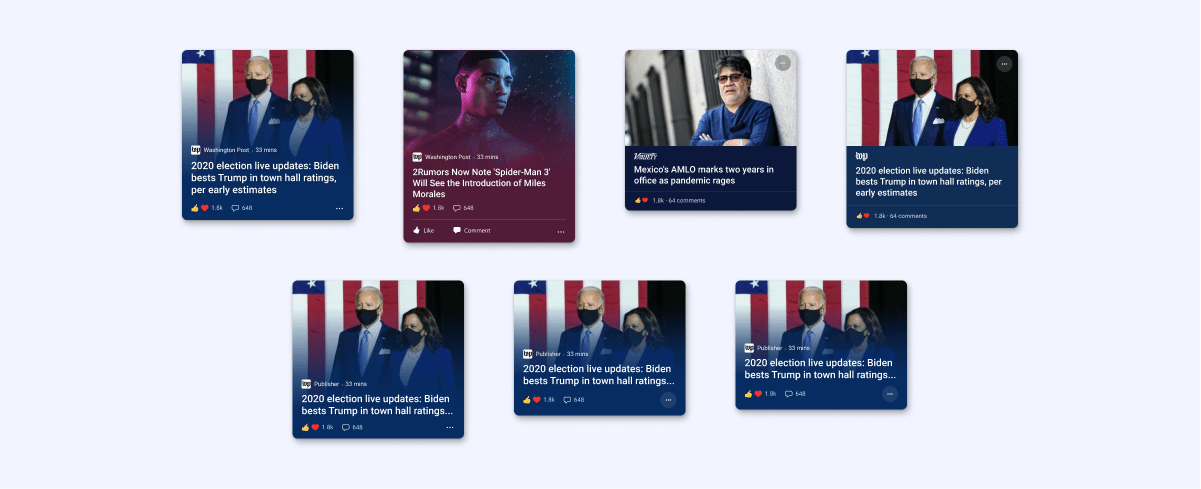
Explorations for layout, height, gradient, and solid color options
Community explorations

Including community features such as reactions and commenting was a new concept for the MS browser experience. To highlight this option, we explored designs for comment previews, data on reactions and comments, and the inclusion of a comment text box to encourage user engagement.
Related content

Explorations for no image cards

UI diversity allows for a variety of content, from trending stories and news highlights like weather and sports to sponsored content and advertising. Below are some explorations for other types of cards and content implementation.
List card explorations

Carousel explorations

The final set of cards includes variations in size and content presentation, maintaining individuality while working as a visual family. The design supports both light and dark mode options.
Final cards

Homepage explorations

The design above shows the homepage layout before updates. It needed to be updated to align with desktop style updates and address accessibility issues, such as image and text overlap in the mini-app tile design.
Updates for the homepage layouts were prepared, and several design options were explored.

Mini app explorations


Similar to the cards, the goals for the mini-app tile design was to enhance its visual expressiveness while providing a seemless nav experience. I explored color, illustration style, contrast for accessibility, icon size, and shadow effects. This visual design needed to complement and integrate with the overall aesthetic. We proceeded with two options and conducted a small A/B study, which indicated greater interest in the ‘A’ option.
Putting it all together

The new cards, page layout, and mini-app tiles make up the complete design for the homepage update. The example feed shows a sampling of varied content in light and dark modes.
Next Steps & Reflections
The iterative evolution for this project continued. Check out the latest on iOS and Android. Our goal was to drive high user acquisition and satisfaction by launching with a robust, continuously enhanced user experience.
The following are steps I would have liked to see worked into the roadmap:
- Continued design refinement based on feedback and additional A/B testing.
- Usability testing with a priority for testing community engagement features.
- Ensured continuous improvement based on user metrics, in-app feedback and industry updates.
By focusing on these areas, higher user acquisition, engagement and satisfaction can be achieved.

SPINS AI

Digital Shelf Analytics

MS Weather

Movie Lifecycle